
Shapeoko 2
Current Status
Section titled “Current Status”Online - if you are having issues please start an issues and request thread on talk and update the tools status page.
The machine is currently kept in the old 3D printer room, currently filled with black and yellow storage boxes and the small laser cutter.
General and Random
Section titled “General and Random”- Training required
- Cutting fluid/oil is not allowed. This precludes most metal machining.
- No toxic materials, such as carbon fiber or pressure treated wood.
- Working area is < 12” by 12” by 2.5”
- The controller is running Grbl 1.1 and you need to connect at 115k baud.
- The two outlets on the front are always hot
- The switch on the front is master power for the spindle and servo motors.
- The arduino is USB powered
- Use the master power switch to safely disable both spindle and servos for a tool change
- Dust collection - use the small vacuum to clean up debris from within and around the enclosure regularly! Remember, the moving parts don’t like small particles and keeping the machine clean will help keep job output quality high!
- Supporting files are on the file server under the Woodshop Committee folder
Creating and Running jobs
Section titled “Creating and Running jobs”Programs like Easel are perhaps the simplest getting started option. Beyond that the Universal G-Code Sender can send any properly formatted G-Code to the machine. To create toolpaths and/or models there are many options and you can find a myriad of reviews and tutorials online including some used at the space already like Fusion360 and V-Carve. There are nuances to this, if unsure ask for help!
Shapeoko Easel software is web driven however it does require driver(s) on the computer. You can bring your own Windows or Mac device or you can use DMS laptop #19 which is setup for this. It has the right drivers for Easel and Universal G-Code Sender.
Easel Machine Settings:
1. Your computer must be connected to the Shapeoko to do setup
2. Main settings:
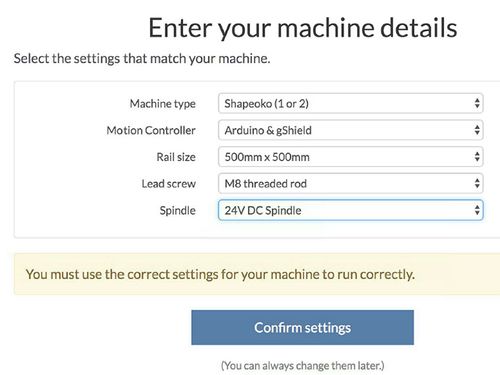
3. Additional settings:
- Limit Switches - NO
- Spindle - MANUAL
- No Z-Probe
End Mills & Cutting Tools
Section titled “End Mills & Cutting Tools”A good source of end mill information slanted toward Shapeoko
Another good write up from Make Magazine
Some of the end mills we have on-hand as of 2016-August
Section titled “Some of the end mills we have on-hand as of 2016-August”| Type | Cutting Diameter | Cutting Length | Overall Length |
| 1F Spiral Upcut | 1/8” | 0.866” | 1.772” |
| 2F Straight | 1/8” | 0.866” | 1.772” |
| 2F Fish Tail Upcut | 1/8” | 0.394” | 1.5” |
| 2F Fish Tail Upcut | 1/16” | 0.315” | 1.5” |
| 30 Degree Solid Carbide Engraving Bits | Very Small :-) | N/A | N/A |
| 1/16” Cutting Diameter Fish Tail | 1/16” | ||
| 1/32” Cutting Diameter Fish Tail | 1/32” | ||
| Diamond Drag Bit | N/A | N/A | N/A |
GRBL Settings
Section titled “GRBL Settings”If you think a setting may be off, e.g. someone has changed the steps per mm/in on an axis, here’s the standard settings: (To display, the GRBL command is ’$$’)
- $0=10 (step pulse, usec)
- $1=255 (step idle delay, msec)
- $2=28 (step port invert mask:00011100)
- $3=2 (dir port invert mask:00000010)
- $4=0 (step enable invert, bool)
- $5=0 (limit pins invert, bool)
- $6=0 (probe pin invert, bool)
- $10=3 (status report mask:00000011)
- $11=0.020 (junction deviation, mm)
- $12=0.002 (arc tolerance, mm)
- $13=0 (report inches, bool)
- $20=0 (soft limits, bool)
- $21=0 (hard limits, bool)
- $22=0 (homing cycle, bool)
- $23=1 (homing dir invert mask:00000001)
- $24=25.000 (homing feed, mm/min)
- $25=635.000 (homing seek, mm/min)
- $26=100 (homing debounce, msec)
- $27=1.000 (homing pull-off, mm)
- $100=40.200 (x, step/mm)
- $101=40.200 (y, step/mm)
- $102=320.000 (z, step/mm)
- $110=1500.000 (x max rate, mm/min)
- $111=1500.000 (y max rate, mm/min)
- $112=500.000 (z max rate, mm/min)
- $120=25.000 (x accel, mm/sec^2)
- $121=25.000 (y accel, mm/sec^2)
- $122=25.000 (z accel, mm/sec^2)
- $130=290.000 (x max travel, mm)
- $131=290.000 (y max travel, mm)
- $132=54.000 (z max travel, mm)
Improvements being Considered
Section titled “Improvements being Considered”- Add limit switches
- Add an E-Stop
- Upgrade to XCarve 2015
- New stand and case
External Links
Section titled “External Links”- The manufacturers wiki is a great place to start.
- A good informational site on Shapeoko and general milling practices and theory
- Make a mosaic tile in Easel youtube video
- Shapeoko Forum
- Winston Moy has created a number of videos from assembling the machine to upgrading it to milling various materials.
- Shapeoko 2 Tutorial using Fusion 360 / CAM 360 by Autodesk
- Shapeoko speeds/feeds information from the forums
- Speeds and Feeds from the Inventables Wiki
- Universal G-Code Sender
- ChilliPeppr (better Universal G-Code Sender - use the GRBL workspace
- On the Carbide 3D site you can sign up for email training
- CNC Cookbook - Another good source of CNC training and information
Migrated from the legacy DMS wiki: original page