
LS20031 GPS
|
||||||||||||||||||||||||
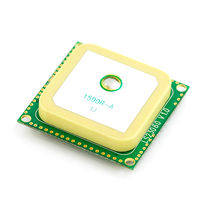
The LS20031 is an amazing little GPS unit. It’s small, lightweight, easy to use and accurate. It even has a built-in micro battery to preserve system data for rapid satellite re-acquisition.
Suppliers
Section titled “Suppliers”- SparkFun, also in retail packaging.
- Pololu
Datasheet and Schematic
Section titled “Datasheet and Schematic”- Datasheet: Media:LS20030-3_datasheet_v1.2.pdf (mostly useless and wrong)
- Schematic: None
Don’t let the datasheet fool you, the GPS defaulted to a baud rate of 57600 8N1 and not the 9600 8N1 that the datasheet claims.
Pinout
Section titled “Pinout”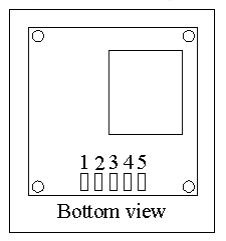
- Vcc
- RX
- TX
- GND
- GND or not connected
Sparkfun has an excellent tutorial on preparing the LS20031 for use on a breadboard.
Commands
Section titled “Commands”This board accepts standard MTK/NMEA commands and outputs in the same format. When sending commands to the GPS you must ensure that the checksum is correct, otherwise the command will be ignored. I recommend using the handy MTK NMEA checksum calculator. Commands must also be terminated by a CRLF (“\r\n”).
Baud Rate
Section titled “Baud Rate”Baud rate is set with the $PMTK251 command. For example, to set the baud rate to 9600:
$PMTK251,9600*17\r\nUpdate Rate
Section titled “Update Rate”SparkFun recommends sticking to 5Hz, as it is more reliable than 10Hz on this device. 1Hz Output:
$PMTK220,1000*1F\r\n2Hz Output:
$PMTK220,500*2B\r\n4Hz Output:
$PMTK220,250*29\r\n5Hz Output:
$PMTK220,200*2C\r\n10Hz Output:
$PMTK220,100*2F\r\nGPS Augmentation Settings
Section titled “GPS Augmentation Settings”Enable SBAS:
$PMTK313,1*2E\r\nDisable SBAS:
$PMTK313,0*2F\r\nQuery SBAS:
$PMTK413*34\r\n- 0 = Disabled
- 1 = Enabled
Enable WAAS:
$PMTK301,2*2E\r\nDisable WAAS:
$PMTK301,0*2C\r\nQuery WAAS/DGPS:
$PMTK401*37\r\n- 0 = Disabled
- 1 = RTCM
- 2 = WAAS
I recommend using Minicom to view the raw output. If you need to configure the GPS you can use the echo command, once you are listening to the incoming data at the right baud in minicom. Here’s an example command for setting the baud rate to 9600:
echo -e '$PMTK251,9600*17\r' > /dev/ttyUSB0Windows
Section titled “Windows”Embedded
Section titled “Embedded”Additional Resources
Section titled “Additional Resources”- Media:Mtk_packet_user_manual.pdf - Useful for understanding the various $PMTK commands that control our GPS.
- MTK NMEA checksum calculator
Projects That Use This Component
Section titled “Projects That Use This Component”Migrated from the legacy DMS wiki: original page