
Thunder Laser
DMS Wiki is being migrated to source.dallasmakerspace.org
Please go see the content on Source.
Link: https://source.dallasmakerspace.org/display/LASER/Thunder+Laser
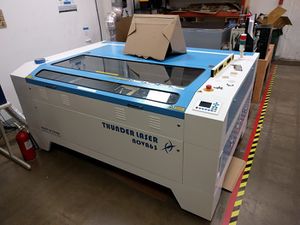 Thunder Laser Laser Cutter
Thunder Laser Nova 63
Section titled “Thunder Laser Nova 63”1600mm x 1000mm (63” x 39.4”x 9.8”) 130 Watts of Power
Thunder Laser Nova 35
Section titled “Thunder Laser Nova 35”900mm x 600mm (35.4″ x 23.6″ x 9.8”) 130 Watts of Power (The tools page lists this as a 100W laser)
What is a laser cutter?
Section titled “What is a laser cutter?”A CNC laser cutter is a computer controlled tool for engraving and cutting. It uses a high-powered laser to burn through material, leaving a very crisp cut.
Materials
Section titled “Materials”Please see the list of Laser Cutter Materials for materials that are not allowed to be cut on the machine.
Material Speed and Power settings: File:Thunder Laser parameters for different materials-130watt SP V6.pdf
Rotary Engraving on Thunder
Section titled “Rotary Engraving on Thunder”https://dallasmakerspace.org/wiki/Laser_Committee#Rotary_Tool_Training_for_the_Thunder
OEM User’s Manuals
Section titled “OEM User’s Manuals”Thunder Laser Software Manual RDWorks v8.0
RDWorks Software manual from RDWorks Lab (non-OEM)
Thunder Laser Nova 63 THUNDER
New 2016.04. Direct from Thunder Laser in China.
Thunder Laser Nova 35 DONNER and BLITZEN
New 2017.12. Direct from Thunder Laser in China.
Head Crashes:
- Don’t put anything in the way of the head so that it crashes.
- The Thunder Nova 35 and 63 Lasers have servos (steppers with optical encoders). If they sense a lot of skipped steps they will just give up and assume something has gone terribly wrong. This can crash the head. Resetting the machine clears things and it should go back to normal operation.
- The “reset” button also helps when the machine loses track of its place. It forces a re-Home and then rights itself. This can happen with the rotary attachment, too.
Migrated from the legacy DMS wiki: original page