
Garage Door Remote Control
Introduction
Section titled “Introduction”The Garage Door Remote Control Project is intended to primarily provide a secure method for the Board of Directors, Committee Chairs and select other members to remotely open or close the ramp garage door.
Use cases include closing the door when it is open. It is often left open by members who get distracted after they bring in their projects. We don’t need to be airconditioning all of Carrollton, or letting in humidity and mosquitoes. Another use case would be letting in trades people to fix building issues if no one is available inside the building.
Requirements
Section titled “Requirements”Software
Section titled “Software”- Software for accessing the garage door camera feeds for safety checks
- Software for accessing Active Directory for login control
- Active Directory Group for users
Hardware
Section titled “Hardware”- Network connectivity to the DMS network
- Hardware for powering the device via Power over Ethernet (802.3af)
- PoE Wiring to garage door
- Case to protect device from dust
- Hardware for simulating pressing the garage door switches (Relays)
- Maintenance disconnect key switch
Completed Steps
Section titled “Completed Steps”Software
Section titled “Software”- Demoed early alpha software that displays a fixed camera image and toggles relays
- Created AD Group “CN=Garage Door Controller Access”
- Created AD Service User
- Added Board of Directors group to access
- Added Committee Chairs group to access
- Onsite & Offsite access thru https://physical.dallasmakerspace.org:4444/
Hardware
Section titled “Hardware”- Decided on Raspberry Pi 2/3 for cost and ease of prototyping (RPi3 for processor overkill and WiFi)
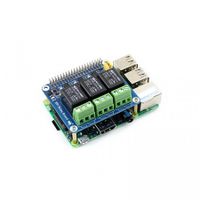
- Decided on RB-Wav-62 relay board by Waveshare (3 5A relays w/ NO and NC contacts)
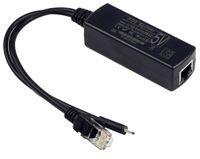
- Decided on PoE to 5v Micro USB adapter (UCTRONICS IEEE 802.3af Active PoE to Micro USB 5V 2.4A for Raspberry Pi)
- Installed PoE to garage door
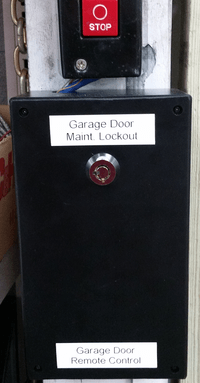
- Installed system in box underneath the switch
Next Steps
Section titled “Next Steps”Software
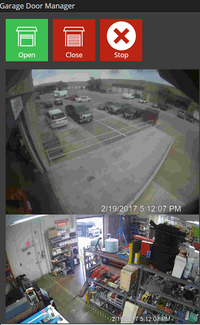
Section titled “Software”Config page for web page port, relay timing and relay pin numberBought/Built icons for screen buttonsAdded buttons to Open, Close and Stop garage doorAdded static camera imageAdded refresh button for camera imageActive Directory loginActive Directory RFID (Employee ID) lookupActive Directory Member of Group lookupLive camera imagesRemoved refresh button for camera images- Hall Effect sensor
- EMail alarm to list if door open x minutes
Pinhole in firewall for HTTPS://garagedoor.local- Add option to lockout the door that holds open the “Stop” relay
- Add detail log to existing SQL database
Hardware
Section titled “Hardware”Raspberry Pi 3RPi relay boardIR Sensor802.3af Power over Ethernet AdapterWood mockup and test fit casePurchase project boxRun PoE wiring to garage doorConnect relay to motor controllerInstall maintenance disconnect key switch- Connect IR sensor
- Hall effect sensor for door open sense
- Connect Hall Effect sensor
Status
Section titled “Status”- 11/13/2016 - Ordered RPi relay board ~$25
- 11/15/2016 - Received RPi relay board
- 11/26/2016 - Alpha software demoed
- 11/27/2016 - Ordered RPi3 ~$35
- 11/27/2016 - Ordered PoE adapter ~$13
- 12/07/2016 - Received/installed PoE adapter
- 12/30/2016 - Beta software demoed
- 01/15/2017 - Added BoD and Chairs to access
- 01/24/2017 - Camera views finalized
- 02/09/2017 - Hardware installed and connected to switch
- 02/09/2017 - Currently using WiFi with a fixed IP address
- 02/13/2017 - Pinhole thru firewall created on port 4444 for https access
- 02/17/2017 - Installed Ethernet for connectivity and PoE
- 02/19/2017 - Moved fixed IP to Ethernet and disabled WiFi on RPi3
- 02/21/2017 - Purchased and installed project box and ACE key switch
- 02/22/2017 - Keys are in Server Room.
Photos
Section titled “Photos”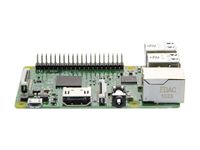
Project members
Section titled “Project members”- Stan Simmons
- Mike Kelp
Resources
Section titled “Resources”- http://www.robotshop.com/en/3-channel-raspberry-relay-board.html
- File:Rpi relay board - waveshare wiki.pdf
Migrated from the legacy DMS wiki: original page